Fast camera scanning
Scan QR codes and common barcode formats, then use actions appropriate to recognized content.
CodeTaska QR
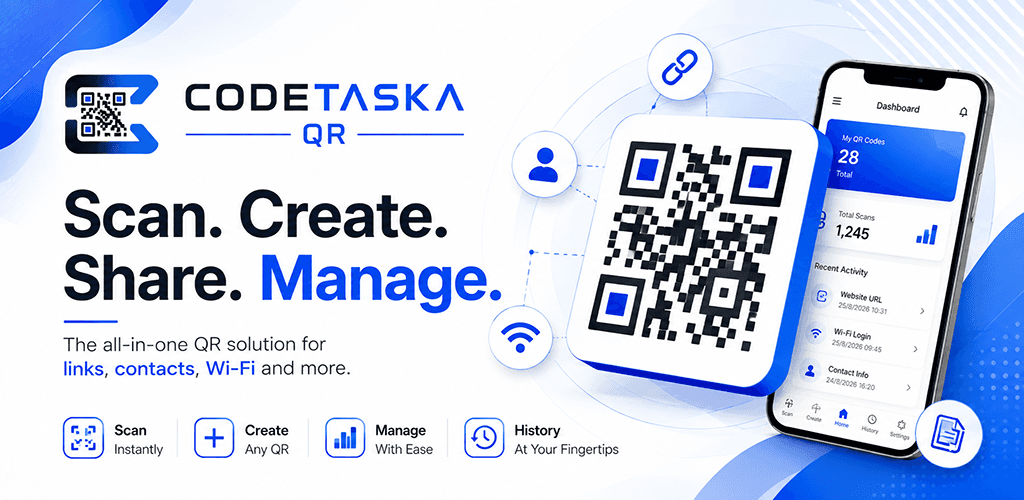
CodeTaska QR is an OERENA Android product that brings QR and barcode scanning, creation, history and practical code-management tools into one focused experience. It is currently available only to approved closed-testing participants.
Overview
CodeTaska QR helps people move from a scanned code or an idea to a useful, organized result. Testers can scan QR codes and common barcode formats, create codes for practical information, work with saved history and use supported sharing, sync and advanced tools without turning a focused utility into a cluttered workspace.
A focused QR and barcode toolkit for scanning, creating, managing and organizing codes.
How it works
A simple journey through the core actions that help people get value from the product.
Use the camera or select a supported image or PDF to read a QR code or barcode.
Open recognized content actions or choose the information you want to turn into a new code.
Keep useful scan and creation records in searchable history when history saving is enabled.
Export, share or use supported cloud and advanced tools when they fit the task.
Key features
The CodeTaska QR experience is organized around practical tools that support its core purpose.
Scan QR codes and common barcode formats, then use actions appropriate to recognized content.
Read supported codes from a selected image or PDF when the code is not in front of the camera.
Create codes for websites, text, Wi-Fi, contacts, email, phone, SMS, payments and product information.
Generate supported barcode formats for relevant product and organizational workflows.
Save, search, favorite, organize, export or clear scan and creation records stored on the device.
Save or share generated code artwork when you choose to continue a workflow outside the app.
Signed-in testers can use supported history backup and restore tools when they choose.
Eligible testing experiences include supported dynamic destinations, scan insights and AI-assisted creation tools.
Who it is for
People sharing personal links, contact information and useful digital entry points.
Businesses connecting everyday customer touchpoints with digital information.
Teams linking products, shelves and in-store experiences to useful digital actions.
Businesses creating practical links to menus, locations and customer information.
Teams sharing event details, contact points and relevant participant information.
Teams creating measurable digital entry points across physical and campaign materials.
People connecting products with useful information and digital follow-up.
Groups managing QR and barcode workflows across professional and operational contexts.
Product roadmap
The roadmap communicates direction without promising release dates. Priorities may evolve as the product and its users develop.
Testing scanning, creation, history, account, subscription and supported advanced workflows with a limited Google Play audience.
Using tester feedback to improve device compatibility, scan quality, workflow clarity, restoration and the overall product experience.
Evaluating broader access, deeper code-management capabilities and useful OERENA ecosystem connections after closed-testing learning.
FAQ
A concise introduction to the product, its audience and its current direction.
CodeTaska QR is a smart QR and barcode platform for creating, managing and analyzing digital codes for personal, professional and business use.
Supported QR code types include websites, text, Wi-Fi, email, phone, SMS, WhatsApp, contact details, events, locations, social profiles, business cards, products and payment information.
Yes. CodeTaska QR supports barcode creation for relevant product and business workflows.
Yes. It is being developed for small businesses, retailers, restaurants, marketing teams, product sellers and other organizations alongside individual use.
A dynamic code can keep the same printed pattern while its managed destination is updated.
The platform is designed to provide useful signals around managed code activity.
CodeTaska QR supports local history and is developing cloud-sync foundations for supported history management.
No. CodeTaska QR is currently in closed testing and access is limited to approved testers through Google Play.
Open the CodeTaska QR opportunity in OERENA Testing, sign in with a verified OERENA Account and submit an application. Private test access is shared with accepted participants in their testing workspace.
Related products
Explore complementary OERENA products selected from the shared product data.
Start a conversation
Talk to OERENA about your needs, potential partnerships or how this product fits into a wider digital journey.